If your Brother printer is showing as offline via Brother iPrint and Scan, you’re not alone. This issue is common on both Windows and Mac systems, especially when using wireless connections. The printer may be powered on, connected to Wi-Fi, and even ready, yet the iPrint & Scan app refuses to detect it or shows it as offline.
Table of Contents
ToggleAt Printer Offline Fix, we help users resolve Brother printer and scanner connectivity issues daily across the USA and Canada. In this guide, we’ll explain why this happens, how to fix it properly, and how to prevent it from returning.
Why Is My Brother’s iPrint and Scan Not Working?
When Brother iPrint and Scan stops working, the issue is usually related to communication failure between the app, your system, and the printer.
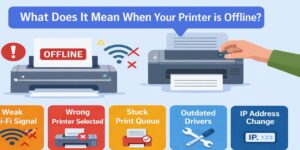
The most common causes include:
- The printer and computer are on different networks
- Firewall or antivirus software is blocking communication
- The printer’s IP address has changed
- The app cannot detect the printer automatically
- Driver or software components are corrupted
Even if the printer appears connected, iPrint & Scan requires correct network communication and background services to function properly.
Brother Printer Showing as Offline via Brother iPrint and Scan (Windows)
If you’re using Windows and your Brother printer is showing as offline via Brother iPrint and Scan, the issue is often related to printer ports or driver configuration.
Common Windows Causes
- Incorrect printer port selected
- Windows update replaced Brother drivers
- Print spooler service is stuck
- Network discovery is disabled
- Firewall blocking local network traffic
Windows frequently modifies printer configurations during updates. When this happens, the printer may still work physically, but iPrint & Scan cannot communicate with it properly.
How to Fix on Windows
- Ensure the printer is not set to “Use Printer Offline”
- Restart the Print Spooler service
- Confirm the correct TCP/IP port is selected
- Reinstall or repair Brother iPrint & Scan
- Restart both the printer and router
These steps usually restore communication between Windows and the printer.
Brother Printer Showing as Offline via Brother iPrint and Scan (Mac)
On macOS, Brother printer offline issues are often related to AirPrint configuration or network permission settings.
Common Mac Causes
- macOS privacy settings blocking printer access
- Printer added via incorrect protocol
- AirPrint conflict
- Sleep mode interrupting connection
- Wi-Fi network switching automatically
Mac systems are sensitive to network transitions. If your Mac switches from one Wi-Fi band to another, the printer may remain on the original network while your Mac connects elsewhere.
How to Fix on Mac
- Confirm printer and Mac are on the same Wi-Fi network
- Remove and re-add the printer using the correct protocol
- Restart the Mac print system
- Reinstall Brother iPrint & Scan
- Disable sleep temporarily to test stability
These actions usually bring the printer back online in iPrint & Scan.
Why Is My Brother’s Printer Scanner Not Scanning?
If your printer is detected but scanning does not work, the issue is usually software-based rather than hardware failure.
Common reasons include:
- Scanner driver not installed correctly
- Network scan settings not configured
- Firewall blocking scan communication
- Outdated Brother utilities
- Corrupted scan profile
Scanning requires different communication protocols than printing. It is possible for printing to work while scanning fails.
To fix scanning issues:
- Install the full Brother driver package
- Enable network scanning in printer settings
- Allow iPrint & Scan through firewall
- Restart background services
Why Does My Brother Printer Show Offline When Connected?
A printer can show offline even when connected because connection does not guarantee communication.
Your Brother printer may:
- Be connected to Wi-Fi
- Show ready status
- Appear in network devices
But if your computer is trying to reach it at the wrong IP address or through the wrong port, the system labels it offline.
The printer isn’t broken — the communication path is.
Brother iPrint and Scan Can’t Find Printer
If the app cannot detect the printer:
- Check router settings
- Ensure printer IP address hasn’t changed
- Disable VPN temporarily
- Confirm no network isolation settings are enabled
Some routers isolate devices from each other for security. This prevents apps from detecting printers.
How Printer Offline Fix Resolves Brother iPrint Issues
At Printer Offline Fix, we follow a structured process:
- Verify network communication
- Identify IP address mismatches
- Correct printer ports
- Repair iPrint & Scan software
- Stabilize network scanning services
- Test after restarts and sleep cycles
We focus on long-term stability, not temporary resets.
Secure Remote Support for Brother Printers
Printer Offline Fix provides secure remote troubleshooting across the USA and Canada.
Our support sessions are:
- Encrypted
- Permission-based
- Limited to printer settings
- Closed immediately after completion
Your privacy and system security are protected at all times.
Prevent Brother Printer Offline Issues in the Future
To reduce recurring issues:
- Keep Brother drivers updated
- Avoid duplicate printer entries
- Assign stable network settings
- Address offline warnings immediately
- Restart router occasionally but check printer settings after
Preventative configuration saves time and frustration.
When to Seek Professional Help
Consider professional assistance if:
- Brother printer keeps showing offline repeatedly
- iPrint & Scan fails even after reinstall
- Scanning does not work consistently
- Multiple devices cannot detect the printer
- You rely on printing or scanning for business
In these cases, structured troubleshooting prevents wasted time.
Final Thoughts
If your Brother printer is showing as offline via Brother iPrint and Scan, the issue is almost always related to communication, not hardware damage. Whether you’re using Windows or Mac, the solution involves restoring correct network paths, repairing drivers, and stabilizing app communication.
If you’re tired of repeated offline errors, Printer Offline Fix is here to help you restore stable printing and scanning quickly and safely.