Seeing your Brother printer marked as offline can be frustrating, especially when it’s powered on and you need to print urgently. This problem affects home users, remote workers, and offices alike. The good news is that most Brother printer offline issues are not hardware failures. They are usually caused by communication problems that can be fixed once you know where to look.
Table of Contents
ToggleAt Printer Offline Fix, we help users across the USA and Canada bring Brother printers back online every day. This guide explains why Brother printers go offline, how to switch them from offline to online, how to reconnect them to Wi-Fi, and how to prevent the issue from happening again.
How Do I Get My Brother Printer Back Online?
To get your Brother printer back online, you must restore proper communication between the printer, your computer, and the network or connection being used.
A Brother printer goes offline when:
- The computer cannot reach the printer
- The printer port is incorrect
- The driver is outdated or conflicting
- The network connection has changed
The printer itself is usually working fine. The problem is almost always on the connection or system side.
Fixing the root cause is what brings the printer back online permanently.
How Do I Fix My Brother Printer from Offline to Online?
Fixing a Brother printer from offline to online is not a physical switch on the printer. It’s about correcting the settings and communication path on your device.
Step 1: Check If “Use Printer Offline” Is Enabled
Sometimes this option gets turned on automatically.
- Open your printer settings
- Right-click your Brother printer
- Make sure “Use Printer Offline” is unchecked
Step 2: Set the Correct Brother Printer as Default
Duplicate printer entries are common. Sending print jobs to the wrong one will always show offline.
Step 3: Verify the Printer Port
If the port doesn’t match how the printer is connected (Wi-Fi, USB, or network), the printer won’t come online.
These steps alone resolve many Brother printer offline cases.
Why Has My Brother Printer Gone Offline?
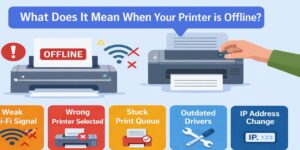
When users ask why has my Brother printer gone offline, the cause is usually a recent change rather than a sudden printer failure.
Common triggers include:
- Router restart or Wi-Fi change
- Operating system or driver update
- Printer waking from sleep mode
- Network IP address change
- Print spooler service interruption
These changes often happen automatically, which is why the printer appears to go offline “for no reason.”
Why Is My Brother Printer Saying It’s Offline When It Isn’t?
This is one of the most confusing Brother printer problems.
Your printer may be:
- Powered on
- Showing “Ready”
- Connected to Wi-Fi
- Visible on the network
Yet your computer still shows it as offline.
That’s because online or offline status is decided by your computer, not the printer. If your system cannot communicate with the printer at the expected address or through the correct port, it marks the printer as offline even when it’s actually ready.
How Do I Reconnect My Brother Printer to My Wi-Fi?
If your Brother printer lost its wireless connection or is connected to the wrong network, reconnecting it properly is essential.
To reconnect your Brother printer to Wi-Fi:
- Make sure the printer is connected to the correct wireless network
- Ensure the printer and your device are on the same network
- Avoid guest networks or extenders during setup
- Restart the printer after reconnecting
Once Wi-Fi is restored, the printer still needs the correct port and driver settings to show online.
Brother Printer Offline After Router Restart
This is one of the most common reasons Brother printers go offline.
Most routers assign IP addresses automatically. After a router restart:
- Your Brother printer may receive a new IP address
- Your computer still tries to reach the old one
- Print jobs never reach the printer
The result is a Brother printer that’s connected to Wi-Fi but shows offline.
Unless the printer configuration is corrected, this issue will keep happening.
How Do I Get My Brother Printer to Get Back Online?
To get your Brother printer back online consistently, you need to fix the communication issue instead of relying on restarts.
A proper approach includes:
- Restarting print services
- Clearing stuck print jobs
- Correcting printer port settings
- Repairing or reinstalling Brother drivers
- Verifying network consistency
This process ensures the printer stays online after restarts and sleep cycles.
How Do I Change My Brother Printer from Offline to Online?
Changing a Brother printer from offline to online means updating the system settings that control how print jobs are sent.
Key things to check:
- The printer is not paused
- The correct connection type is selected
- The correct port is in use
- The driver matches the printer model
Once these settings are correct, the printer status switches to online automatically.
How Do I Bring My Brother Printer Online?
You bring a Brother printer online by restoring the correct connection path between your device and the printer.
This includes:
- Ensuring the printer is reachable on the network
- Making sure the driver is functioning correctly
- Restarting background print services
- Testing printing after restarts
Simply turning the printer on is not enough if the system settings are wrong.
Brother Printer Offline Due to Driver Issues
Drivers translate print commands into instructions the printer understands. If the driver is outdated, corrupted, or incompatible, the printer may appear offline even when connected.
Driver problems often occur after:
- System updates
- Automatic driver replacements
- Interrupted installations
Installing the correct Brother driver for your model usually resolves recurring offline errors.
Brother Printer Offline and Print Spooler Problems
The print spooler manages all print jobs in the background. If it freezes or crashes:
- Print jobs get stuck
- The printer may suddenly show offline
- Restarting the printer alone won’t help
Restarting and stabilizing the spooler is often necessary to restore printing.
Wireless vs USB Brother Printers
Wireless Brother Printers
Wireless printers are convenient but more sensitive to network changes. Wi-Fi drops, IP address changes, and router behavior can all cause offline issues.
USB Brother Printers
USB printers are simpler but can still go offline due to driver conflicts or power management settings.
Knowing how your Brother printer is connected helps narrow down the cause quickly.
Why Restarting Works Only Temporarily
Restarting the printer or computer often brings the printer back online briefly. That’s because restarting clears temporary errors.
However, restarting does not fix:
- Incorrect printer ports
- IP address mismatches
- Driver conflicts
That’s why the Brother printer goes offline again later.
How Printer Offline Fix Solves Brother Printer Offline Issues
At Printer Offline Fix, we don’t rely on trial and error. Our technicians focus on fixing the root cause so the problem doesn’t return.
Our Brother printer troubleshooting process includes:
- Verifying printer connectivity
- Identifying network address mismatches
- Correcting printer ports
- Repairing driver issues
- Restarting and stabilizing print services
- Testing after restarts and sleep cycles
We consider the issue resolved only when the printer stays online consistently.
Safe and Secure Remote Printer Support
Printer Offline Fix provides secure remote support across the USA and Canada.
Our support sessions are:
- Encrypted
- Permission-based
- Limited to printer-related settings only
- Closed immediately after completion
Your privacy and system security are always respected.
When Should You Get Professional Help?
You should consider professional support if:
- Your Brother printer keeps going offline
- Restarting only works temporarily
- You’ve already tried basic troubleshooting
- Printing is critical for work or business
- Multiple devices are affected
In these cases, continued trial and error wastes time and increases frustration.
Why Users Trust Printer Offline Fix
Customers trust Printer Offline Fix because we specialize in printer offline problems and fix them properly.
We’re trusted for:
- Printer-focused expertise
- Clear, honest explanations
- Secure remote troubleshooting
- Fixes designed to prevent repeat issues
- Same-day resolution whenever possible
How to Prevent Brother Printer Offline Issues in the Future
You can reduce future offline problems by:
- Keeping drivers updated
- Avoiding duplicate printer installations
- Addressing offline messages immediately
- Maintaining stable network settings
Prevention saves time and stress.
Final Thoughts
So, how do you get your Brother printer back online?
By fixing the communication issue rather than repeatedly restarting devices. Brother printers usually go offline due to network changes, driver conflicts, or incorrect settings, not because the printer is broken.
Once the real cause is corrected, your Brother printer can stay online and reliable.
If you’re tired of dealing with a Brother printer offline message, Printer Offline Fix is here to help you restore printing quickly and keep it working without interruptions.