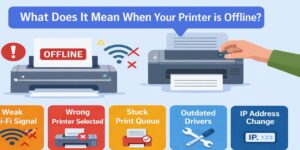
If you’re asking why does my Lexmark wireless printer keep going offline, you’re dealing with a problem that’s far more common than it should be. The printer is powered on. Wi-Fi looks connected. Yet your computer suddenly reports the printer as offline, print jobs stall, and work grinds to a halt.
Table of Contents
ToggleWhat makes this issue frustrating is its unpredictability. Sometimes a restart fixes it for a while. Other times, nothing seems to help. The truth is that when a Lexmark wireless printer keeps going offline, the cause is rarely the printer itself. It’s almost always a communication or configuration problem that can be corrected once identified.
At Printer Offline Fix, we see this issue daily—and we know how to resolve it properly so it doesn’t keep coming back.
What “Offline” Really Means for Wireless Printers
When your system shows a Lexmark printer as offline, it doesn’t mean the printer is broken or disconnected from power. It means your computer cannot communicate with the printer using the expected network path.
Wireless printing relies on multiple components working together:
- The printer’s network connection
- The router’s behavior
- The computer’s network settings
- The printer driver and port
If any one of these is misaligned, the printer appears offline—even while Wi-Fi is technically connected.
The Most Common Reasons Lexmark Wireless Printers Go Offline
1) IP Address Changes on the Network
This is the number one cause.
Most home and office routers assign IP addresses automatically. When the router restarts or refreshes its network, your Lexmark printer may receive a new IP address. Your computer, however, keeps trying to reach the old one.
Result:
- Printer stays on Wi-Fi
- Printer looks ready
- Computer can’t find it
The printer appears offline until the address mismatch is corrected.
2) Unstable Wi-Fi Connections
Wireless printers are sensitive to network stability. Even brief drops can interrupt communication.
Common triggers include:
- Weak Wi-Fi signal near the printer
- Router firmware updates
- Network congestion
- Switching between Wi-Fi bands
The printer may reconnect on its own, but the computer doesn’t always re-establish communication correctly.
3) Incorrect Printer Port Configuration
Your computer sends print jobs through a specific port. After updates or network changes, the system may switch ports automatically—often without notifying you.
If the port doesn’t match the printer’s current network address, the printer will keep showing offline.
4) Driver Conflicts or Outdated Drivers
Printer drivers translate print jobs into instructions the printer understands. If a Lexmark driver becomes outdated, corrupted, or partially replaced during an update, communication can fail intermittently.
This often happens after:
- Operating system updates
- Automatic driver replacements
- Interrupted driver installations
The printer may work one day and fail the next.
5) Print Spooler Service Problems
The print spooler manages all print jobs in the background. If it freezes, crashes, or gets stuck on a failed job, the printer can suddenly appear offline.
Because this happens silently, users rarely realize the spooler is the cause.
6) Firewall or Security Software Blocking Printer Traffic
Some security programs block local network communication while allowing internet access. Browsing works, but printer traffic is restricted.
This makes the printer appear offline even though it’s connected to Wi-Fi.
Why Restarting Works… Temporarily
Restarting the printer, computer, or router often restores printing for a short time. That’s because restarting:
- Resets temporary network errors
- Restarts background services
- Forces a fresh connection
However, restarting doesn’t fix the underlying cause. If the port, IP address, or driver is still wrong, the printer will go offline again.
That’s why the problem keeps repeating.
How to Fix a Lexmark Wireless Printer That Keeps Going Offline
A proper fix focuses on stability, not quick resets.
Step 1: Confirm Network Consistency
Make sure the printer and computer are on the same network. Guest networks and extenders often cause issues.
Step 2: Verify the Printer Port
Ensure the printer is using a standard TCP/IP port that matches the printer’s current IP address.
Step 3: Stabilize the IP Address
Configuring a consistent network address for the printer prevents communication from breaking after router restarts.
Step 4: Update or Reinstall Lexmark Drivers
Remove outdated or duplicate drivers and install the correct driver for your Lexmark model and system.
Step 5: Restart and Clear the Print Spooler
Clearing stuck jobs and restarting the spooler restores normal print flow.
Step 6: Review Firewall and Security Settings
Ensure printer communication isn’t being blocked at the system or network level.
Wireless vs USB: Why Wireless Is More Prone to Offline Issues
Wireless printers depend on network behavior, which can change without warning. USB printers are simpler but still affected by drivers and power settings.
If your Lexmark printer is wireless and keeps going offline, network stability and addressing should be the first areas checked.
When the Printer Says “Ready” but the Computer Says “Offline”
This mismatch is common and confusing.
The printer’s display shows its internal status. Your computer checks drivers, ports, services, and network paths. Both can look fine independently while still failing to communicate with each other.
That’s why the printer can appear ready yet still be offline on your system.
When to Get Expert Help
You should consider professional troubleshooting if:
- The printer goes offline repeatedly
- Restarting only helps briefly
- You’ve tried multiple fixes without success
- Printing is essential for work or deadlines
At Printer Offline Fix, we focus on identifying the exact point where communication breaks and correcting it so the issue doesn’t return.
Preventing Future Offline Issues
While no setup is perfect, you can reduce recurring problems by:
- Keeping drivers updated manually
- Avoiding duplicate printer installations
- Using a stable Wi-Fi connection
- Addressing offline warnings immediately
Prevention saves time and frustration long-term.
Frequently Asked Questions
Why does my Lexmark wireless printer keep going offline?
Your Lexmark wireless printer keeps going offline because unstable Wi-Fi, changing IP addresses, or incorrect printer port settings disrupt communication.
In many homes and offices, especially with shared networks, routers automatically refresh connections. When this happens, the printer may reconnect, but your computer still looks for it at an old network address. This mismatch makes the printer appear offline even though it’s powered on and connected.
How do I fix a Lexmark wireless printer that keeps disconnecting?
You can fix a Lexmark wireless printer that keeps disconnecting by stabilizing the network connection, correcting printer ports, and updating drivers.
Start by ensuring the printer and computer are on the same Wi-Fi network. Then check that the printer is using a standard TCP/IP port instead of an auto-detected one. In many cases we see around Toronto offices, outdated drivers also cause repeated disconnections.
Why is my Lexmark wireless printer offline but still connected to Wi-Fi?
A Lexmark wireless printer can show offline while connected to Wi-Fi when the computer cannot communicate with its current network address.
Wi-Fi connection only means the printer is on the network, not that your system can reach it correctly. If the printer’s IP address changes or the wrong port is selected, print jobs never reach the printer, triggering the offline message.
What causes a Lexmark wireless printer to go offline repeatedly?
Repeated Lexmark wireless printer offline issues are usually caused by network changes, driver conflicts, or background print services restarting unexpectedly.
This is common in environments where routers reboot overnight or systems update automatically. Each small change can break communication if the printer settings are not properly stabilized.
Why does my Lexmark printer go offline after restarting the router?
After restarting the router, your Lexmark printer may receive a new IP address while your computer still uses the old one.
Routers often assign network addresses dynamically. When those addresses change, the printer is technically online, but your computer is sending print jobs to the wrong location, making the printer appear offline.
Is a driver issue causing my Lexmark wireless printer to show offline?
Yes, outdated or corrupted Lexmark printer drivers can prevent proper communication and cause the printer to show offline unexpectedly.
Drivers act as translators between your system and the printer. After system updates or partial installations, the driver may no longer match the printer’s configuration, leading to random offline errors.
How can I stop my Lexmark wireless printer from going offline again and again?
To stop recurring offline issues, the printer must use a stable network address, correct port configuration, and properly installed drivers.
Temporary fixes like restarting help briefly but do not solve the root cause. A proper setup ensures the printer reconnects correctly every time, even after network or system changes.
Why does my Lexmark wireless printer work one day and go offline the next?
This usually happens because automatic updates or network refreshes change printer settings without the user noticing.
The printer itself hasn’t changed, but something around it has. Overnight updates, router behavior, or background services restarting can break communication the next time you try to print.
Can IP address changes make a Lexmark wireless printer go offline?
Yes, IP address changes are one of the most common reasons Lexmark wireless printers suddenly show offline.
When a router assigns a new address to the printer, your computer still tries to reach the old one. Until the port or address is corrected, the printer remains unreachable.
When should I get professional help for Lexmark wireless printer offline problems?
You should seek professional help when the printer goes offline repeatedly and basic fixes only work temporarily or not at all.
If printing is important for work or business and the issue keeps returning, expert troubleshooting can identify and fix the underlying communication problem instead of masking it.
Final Thoughts
So, why does my Lexmark wireless printer keep going offline?
Because wireless printing depends on stable communication across multiple components. When IP addresses change, ports misalign, drivers conflict, or services stall, the printer appears offline—even though it’s powered on and connected.
Your printer is usually not broken.
The connection path is.
Once the root cause is fixed properly, your Lexmark wireless printer can stay online, reliable, and ready whenever you need it.
If the issue keeps returning, Printer Offline Fix is here to help you resolve it correctly and permanently.