If you’re wondering why does my Brother printer say offline suddenly, you’re not alone. This is one of the most common issues Brother printer users face, and it often appears without warning. One moment your printer works fine, and the next your computer refuses to print because it shows the printer as offline.
Table of Contents
ToggleWhat makes this problem so frustrating is that the printer is usually powered on, connected to Wi-Fi or USB, and showing no error lights. Yet printing stops completely. The good news is that this issue is rarely caused by hardware failure. In most cases, it’s a communication problem that can be fixed once the real cause is identified.
At Printer Offline Fix, we help users resolve sudden Brother printer offline issues by focusing on stability, not temporary workarounds.
What “Offline” Really Means
When your Brother printer suddenly says offline, it does not mean the printer is broken or turned off. It means your computer can no longer communicate with the printer using the expected connection path.
Think of it like sending mail to an old address. The building still exists, but the message never arrives. Printer communication works the same way. If the system sends print jobs to the wrong port, IP address, or driver, the printer appears offline even though it’s ready to work.
Common Reasons a Brother Printer Goes Offline Suddenly
1. Network or Wi-Fi Changes
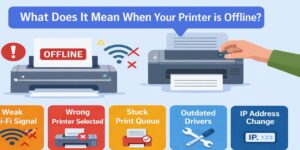
Brother printers connected wirelessly depend on a stable network. If your router restarts, updates its firmware, or briefly drops connection, the printer may reconnect with a new IP address. Your computer may still be trying to reach the old one.
This mismatch is a very common reason a Brother printer suddenly shows offline.
2. Operating System Updates
System updates often change printer behavior without notifying the user. After an update, your system may:
- Replace printer drivers
- Reset printer ports
- Modify background print services
- Change network permissions
As a result, a Brother printer that worked perfectly yesterday can suddenly appear offline today.
3. Incorrect Printer Port Selection
Printer ports act as communication channels. If the port changes or is misconfigured, print jobs go nowhere.
This often happens when:
- A printer is reinstalled automatically
- Multiple versions of the same printer exist
- Network settings change
The printer stays on, but the system sends jobs to the wrong destination.
4. Print Spooler Service Errors
The print spooler manages all print jobs in the background. If it crashes, freezes, or gets stuck on a failed job, the printer may instantly show offline.
Because this happens silently, users often don’t realize the spooler is the cause.
5. Power Saving or Sleep Settings
Many computers and printers use power-saving features. When a device wakes from sleep, communication doesn’t always resume correctly.
This is especially common with:
- Laptops
- Home office setups
- USB-connected Brother printers
The printer wakes up, but the system doesn’t reconnect properly.
6. Firewall or Security Software
Some security programs block printer communication while allowing normal internet access. The printer remains connected, but the system can’t send print jobs.
This makes the offline message appear suddenly, even though nothing obvious has changed.
Why Restarting “Fixes” It—But Only Temporarily
Restarting the printer or computer often clears the problem for a short time. That’s because restarting:
- Resets temporary communication errors
- Restarts the print spooler
- Forces a new network connection
However, if the underlying issue remains—such as a wrong port or unstable network—the printer will go offline again.
This is why many users experience the same offline issue repeatedly.
Brother Printer Says Offline but Is Connected
One of the most confusing situations is when a Brother printer says offline but is clearly connected to Wi-Fi or USB. The printer display may show “Ready,” and the connection lights look normal.
This happens because:
- The printer and computer are connected, but not communicating correctly
- The system is using an outdated driver
- The printer’s network address has changed
- The print spooler is paused
From the printer’s side, everything looks fine. From the system’s side, it can’t complete the connection.
How to Fix a Brother Printer That Suddenly Goes Offline
A proper fix focuses on communication, not just power.
Step 1: Check the Printer’s Status on the System
Make sure the correct Brother printer is selected as the default and that no duplicate printers exist.
Step 2: Verify Printer Port Settings
Ensure the printer is using the correct port, especially for network-connected printers.
Step 3: Restart the Print Spooler
Restarting the spooler clears stuck jobs and resets communication.
Step 4: Update or Reinstall Brother Drivers
Outdated or corrupted drivers are a major cause of sudden offline errors.
Step 5: Stabilize the Network Connection
Confirm the printer and computer are on the same network and that the connection is stable.
Wireless vs USB Brother Printers
Wireless Brother printers are more prone to sudden offline issues because they rely on network stability. USB printers are simpler but can still go offline due to power management or driver conflicts.
Understanding how your printer is connected helps identify the cause faster.
When to Get Expert Help
You should consider professional troubleshooting if:
- The printer keeps going offline repeatedly
- Restarts only fix the issue temporarily
- Printing is critical for work or business
- You’ve already tried basic fixes
At Printer Offline Fix, we focus on identifying the exact reason your Brother printer went offline suddenly and correcting it so it stays online.
Preventing Future Offline Issues
While no setup is perfect, you can reduce the risk of sudden offline problems by:
- Keeping printer drivers updated
- Avoiding duplicate printer installations
- Using a stable network connection
- Addressing offline warnings immediately
Prevention saves time and frustration in the long run.
Final Thoughts
So, why does my Brother printer say offline suddenly?
Because something interrupted communication between the printer and your system. It’s rarely a hardware failure. Most of the time, it’s a driver issue, network change, port mismatch, or background service error.
Once the real cause is fixed properly, your Brother printer can remain online, reliable, and ready whenever you need it.
If the problem keeps returning, Printer Offline Fix is here to help you resolve it correctly—so you can stop restarting and start printing again.