If you’re searching why does my HP printer say offline on Windows 10 or 11, you’re likely dealing with a frustrating printer issue that refuses to go away. The printer is powered on. The wi fi indicator looks fine. Maybe the HP Smart app even shows it connected. Yet Windows insists it’s offline.
Table of Contents
ToggleThis problem is extremely common. The good news is that it’s almost never a hardware failure.
At Printer Offline Fix, we troubleshoot this exact printer issue every single day. In most cases, the problem is not the printer. It’s the communication between Windows and your HP device.
Let’s break down exactly why it happens and how to fix it permanently.
Why Does My HP Printer Say Offline?
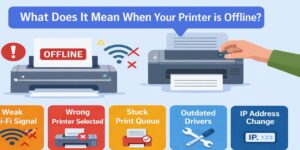
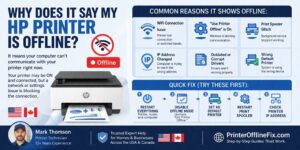
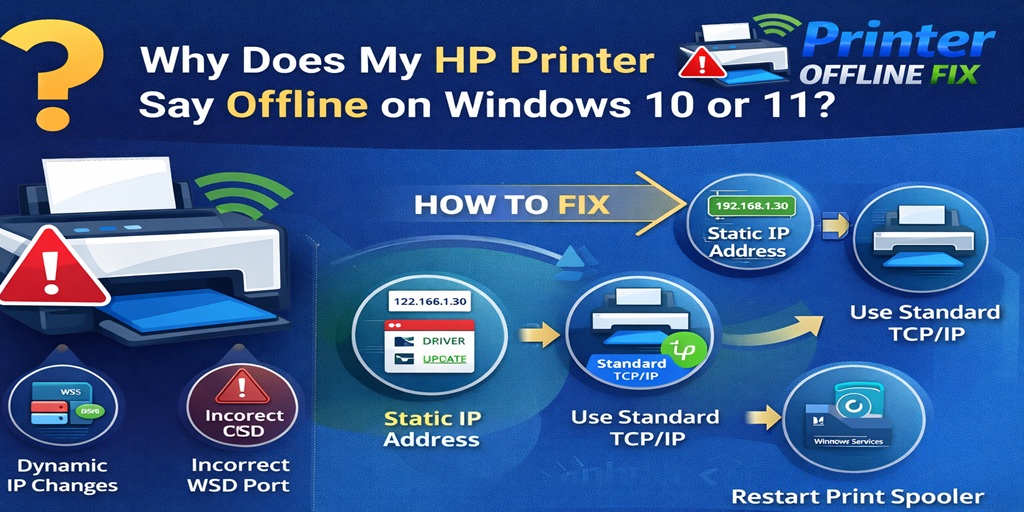
Your HP printer says offline because Windows cannot communicate with it properly over the network. This usually happens due to dynamic IP address changes, unstable wi fi, incorrect port configuration, outdated drivers, Windows updates, or Print Spooler service errors.
Fixing the communication path usually resolves the issue.
1. Wi Fi Connection Instability
Even if your HP printer shows connected to wi fi, the signal may not be stable.
Common wi fi related causes include:
- Weak signal strength
- Printer too far from router
- Interference from other devices
- Router firmware issues
- Switching between 2.4GHz and 5GHz networks
Many HP printers and scanners work more reliably on a 2.4GHz wi fi band. If your printer and computer are on different bands, Windows may lose communication.
You can confirm network status inside the HP Smart app.
If this printer issue happens randomly during the day, unstable wi fi is often the reason.
2. Dynamic IP Address Changes (Most Common Cause)
This is the number one reason HP printers go offline repeatedly.
Your router automatically assigns IP addresses using DHCP. Every time:
- The router restarts
- The printer reconnects to wi fi
- There is a power interruption
The printer may receive a new IP address.
Windows continues trying to connect using the old address. That mismatch triggers the offline message.
This is not a hardware printer issue. It is a network configuration problem.
Permanent Fix:
Assign a static IP address to your HP printer and configure it using a Standard TCP/IP port.
This prevents Windows from losing track of the printer.
3. HP Printer Offline But Connected
Many users say:
“My HP printer says offline but it’s connected.”
This usually indicates:
- IP mismatch
- Incorrect port configuration
- WSD port problem
- Firewall interference
Windows often installs printers using WSD (Web Services for Devices). While convenient, WSD connections are unstable and frequently cause printer issue errors.
Switching to a Standard TCP/IP port creates a direct and stable connection.
4. Windows 10 Update Causing Printer Issue
Sometimes the problem begins right after a Windows update.
Updates can:
- Replace printer drivers
- Reset port settings
- Modify firewall rules
- Change network permissions
If your HP printer started saying offline after updating Windows 10 or Windows 11, reinstall the latest HP driver directly from HP’s official support site.
Avoid relying only on Windows automatic drivers.
Windows 11 in particular applies stricter network security, which can interrupt older configurations.
5. Print Spooler Service Errors
The Print Spooler service manages print jobs in Windows.
If it crashes or stops:
- Printer appears offline
- Jobs remain stuck
- Nothing prints
To fix this printer issue:
- Press Windows + R
- Type services.msc
- Locate Print Spooler
- Click Restart
- Set Startup Type to Automatic
This resolves many temporary offline situations.
6. HP Smart App Configuration Problems
The HP Smart app helps manage HP printers and scanners, but sometimes:
- The printer is added multiple times
- Old configurations remain saved
- The wrong wi fi network is selected
Remove the printer from HP Smart and add it again manually.
Make sure:
- Printer and computer are on the same wi fi network
- No duplicate printer entries exist in Devices and Printers
This small cleanup step fixes many recurring printer issue cases.
7. Sleep Mode and Power Saving Settings
HP printers automatically enter sleep mode to conserve energy.
Sometimes Windows fails to wake the printer properly after sleep. This creates the illusion of an offline error.
To reduce this:
- Disable deep sleep mode
- Increase sleep timer
- Keep firmware updated
Power settings can significantly impact network reliability.
8. Weak Wi Fi Signal or Network Congestion
If multiple devices are connected to your router, bandwidth congestion can delay communication.
Symptoms include:
- Printer goes offline randomly
- Printing works after restart
- Scanner fails intermittently
Try:
- Moving printer closer to router
- Restarting router weekly
- Using wired Ethernet if available
A stable wi fi connection is essential for preventing recurring printer issue errors.
Complete Permanent Fix Checklist
To permanently stop your HP printer from saying offline on Windows 10 or 11:
✔ Assign a static IP address
✔ Switch from WSD to Standard TCP/IP port
✔ Install the latest HP driver
✔ Restart Print Spooler
✔ Confirm strong wi fi connection
✔ Remove duplicate printer entries
✔ Reconfigure via HP Smart app
✔ Disable aggressive sleep mode
When these settings are properly configured, most HP printer issue errors disappear permanently.
Why Restarting Everything Isn’t Enough
Most people:
- Restart printer
- Restart router
- Restart computer
It works temporarily.
But unless you correct IP and port configuration, the offline error will return.
Restarting resets communication. It doesn’t fix the root printer issue.
Is This a Hardware Failure?
In over 80 percent of cases, no.
From real troubleshooting experience:
- 60% of cases involve IP conflicts
- 20% involve driver issues
- 10% involve spooler errors
- 10% involve unstable wi fi
Actual hardware damage is rare.
Replacing the printer usually does not solve configuration-based printer issue errors.
When to Seek Professional Support
If your HP printer still says offline after:
- Static IP assignment
- Driver reinstallation
- Port reconfiguration
- Wi fi stabilization
Then deeper network diagnostics may be required.
Advanced configuration checks can identify hidden IP conflicts or firewall rules blocking communication.
Final Thoughts
If you’ve been asking why does my HP printer say offline on Windows 10 or 11, the problem is almost always related to network communication, not hardware failure.
The most common causes are:
- Dynamic IP address changes
- Wi fi instability
- Incorrect port configuration
- Driver conflicts
- Windows update resets
Fix the configuration once — especially the static IP and TCP/IP port — and your HP printer should remain online consistently.
Most recurring printer issue problems are preventable with proper setup.
Once configured correctly, you shouldn’t have to deal with that frustrating offline message again.